🍳 Recipes
Added in version 1.0.0: Recipes are extras features that you can install on-demand.
Hint
When an executable is made available, you can tweak printer properties using TP_* environment variables. See thermalprinter.constants.Defaults.
Calendar
Print daily stuff from your calendar, and birthdays as a bonus!

Note
🇫🇷 All texts are in French by default. You can tweak those constants to better fit your needs:
- thermalprinter.recipes.calendar.BIRTHDAY = "C'est l'anniversaire de..."
Birthdays introduction.
- thermalprinter.recipes.calendar.MONTH_NAMES = ['Janvier', 'Février', 'Mars', 'Avril', 'Mai', 'Juin', 'Juillet', 'Août', 'Septembre', 'Octobre', 'Novembre', 'Décembre']
Months names.
- thermalprinter.recipes.calendar.NICE_DAY = 'Belle journée :)'
Nice words printed at the end.
- thermalprinter.recipes.calendar.TOMORROW = 'demain'
Tomorrow.
Added in version 2.0.0.
- thermalprinter.recipes.calendar.UNTIL = "Jusqu'à"
Until.
Added in version 2.0.0.
- thermalprinter.recipes.calendar.WHOLE_DAY = 'Toute la journée'
When an event takes the whole day.
Installation:
sudo apt install libcairo2
python -m pip install -U 'thermalprinter[calendar]'
There is an executable made available:
print-calendar --help
Here is the API:
- class thermalprinter.recipes.calendar.Calendar(url: str , printer: ThermalPrinter | None = None)
Print daily stuff from your calendar, and birthdays as a bonus!
- Parameters:
url (str ) – The calendar URL.
printer (thermalprinter.ThermalPrinter | None) – Optional printer to use.
- thermalprinter.recipes.calendar.forge_header_image(now: datetime ) <module 'PIL.Image' from '/home/docs/checkouts/readthedocs.org/user_builds/thermalprinter/envs/latest/lib/python3.13/site-packages/PIL/Image.py'>
Create the image object containing the nice image with current month, and day.
- Parameters:
now (datetime.datetime ) – The current date to compare event’s dates to.
- Return type:
- Returns:
A PNG file-like
PIL.Imageobject.
Added in version 2.0.0: It was a class method in v1.0.0.
- thermalprinter.recipes.calendar.format_event_date(now: datetime , event: Event ) str 
Given the current date, and an iCal event, return the formated event’s start, and end.
- Parameters:
now (datetime.datetime ) – The current date to compare event’s dates to.
event (icalendar.cal.Event) – The iCal event.
- Return type:
- Returns:
The formated event duration.
Added in version 2.0.0.
- thermalprinter.recipes.calendar.localize(event_date: datetime , dst_tz: ZoneInfo ) datetime 
Given an event date, and a timezone, return the localized date.
- Parameters:
event_date (datetime.datetime ) – The event date.
dst_tz (zoneinfo.ZoneInfo ) – The destination timezone to localize the event date to.
- Return type:
- Returns:
The localized event date.
Added in version 2.1.0.
- thermalprinter.recipes.calendar.TIMEZONE = 'Europe/Paris'
The timezone to display proper hours.
- thermalprinter.recipes.calendar.BIRTHDAYS_FILE = '~/.birthdays.lst'
File containing birthdays.
Hint
The content of this file is as follow:
YYYY-MM-DD = Alice
YYYY-MM-DD = Bob
Persian
Persian text uses non standard codes, and it is quite painful to print it out-of-the-box.
So this extra allowes you to print Persian text as easy as follow (you provide the persian keyword-argument, and the magic happens under the wood):
printer.out("...", persian=True)
Installation:
python -m pip install -U 'thermalprinter[persian]'
Here is the API:
- thermalprinter.recipes.persian.IRAN_SYSTEM_MAP
Unicode translations for the Iran code page.
Note
💐 Credits go to @ghorbanpirizad in issue #4 .
Weather
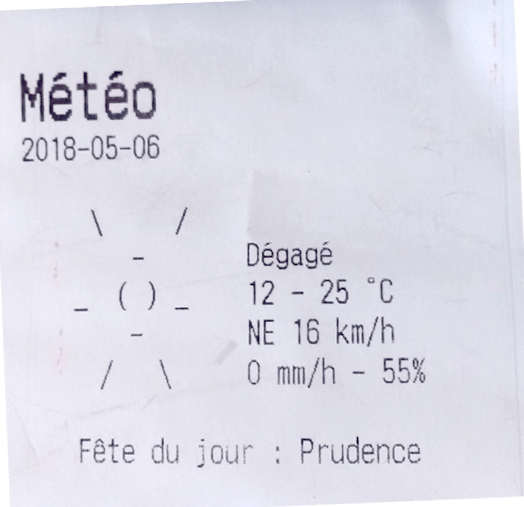
How cool is it to have the weather printed every morning, alongside with the saint of the day? 🥰
Note
🇫🇷 All texts are in French by default. You can tweak those constants to better fit your needs:
- thermalprinter.recipes.weather.DESCRIPTIONS
That is a big one, kept synced with OWM weather-conditions .
- thermalprinter.recipes.weather.TITLE = 'Météo'
Title.
- thermalprinter.recipes.weather.SAINT_OF_THE_DAY = 'Fête du jour : {}'
Prefix before the saint of the day.
- thermalprinter.recipes.weather.NORTH = 'N'
The North cord point abbreviation.
- thermalprinter.recipes.weather.EAST = 'E'
The East cord point abbreviation.
- thermalprinter.recipes.weather.SOUTH = 'S'
The South cord point abbreviation.
- thermalprinter.recipes.weather.WEST = 'O'
The West cord point abbreviation.
Installation:
python -m pip install -U 'thermalprinter[weather]'
There is an executable made available:
print-weather --help
Here is the API:
- class thermalprinter.recipes.weather.Weather(lat: float , lon: float , appid: str , printer: ThermalPrinter | None = None)
Print the weather of the day alongside with the saint of the day. Using the data from OpenWeatherMap.
- Parameters:
lat (float ) – Location latitude.
lon (float ) – Location longitude.
printer (thermalprinter.ThermalPrinter | None) – Optional printer to use.
- thermalprinter.recipes.weather.mps_to_kmph(mps: float ) int 
Convert the wind unity from m/sec to km/h.
- thermalprinter.recipes.weather.wind_dir(angle: float ) bytes | str 
Get the corresponding wind direction arrow, or the cord point abbreviation.
- Parameters:
angle (float ) – The wind angle.
- Return type:
- Returns:
The cord point abbreviation. Either bytes for arrows, or plain string.
Note
Bytes values are
thermalprinter.constants.CodePageTHAI2characters.
- thermalprinter.recipes.weather.ASCII_ARTS
Beautiful weather ASCII arts, copied from schachmat/wego .
- thermalprinter.recipes.weather.SAINTS_FILE = './saints.lst'
File containing calendar saints.
Added in version 2.0.0.
- thermalprinter.recipes.weather.URL = 'https://api.openweathermap.org/data/2.5/onecall?lat={lat}&lon={lon}&units=metric&appid={appid}'
OpenWeatherMap API URL.
- thermalprinter.recipes.weather.USER_AGENT = 'Mozilla/5.0 (X11; Linux x86_64; rv:133.0) Gecko/20100101 Firefox/133.0'
User-Agent HTTP header used to fetch OpenWeatherMap data.
Added in version 2.0.0.
- thermalprinter.recipes.weather.TIMEZONE = 'Europe/Paris'
The timezone to display proper dates.